> For the complete documentation index, see [llms.txt](https://docs.simplifyqa.ai/llms.txt). Markdown versions of documentation pages are available by appending `.md` to page URLs; this page is available as [Markdown](https://docs.simplifyqa.ai/dashboard/requirement-dashboard-guide.md).
# Requirement Dashboard Guide
The **Requirements & User Stories Dashboard** provides end-to-end visibility into requirement planning, execution, stability, estimation accuracy, and delivery health across sprints and releases.
This dashboard enables stakeholders to:
* Track requirement and user story lifecycle
* Monitor sprint execution and ownership
* Measure stability, quality, and estimation accuracy
* Identify delivery risks early using data-driven insights
It is primarily used by **Product Owners, Scrum Masters, QA Leads, and Delivery Managers** during sprint planning, reviews, and retrospectives.
### How to Use Dashboard Graphs (Common Instructions for All Widgets)
Every widget on the dashboard includes a standard **three-dot (⋮) menu** in the top-right corner. These options behave the same across all graphs.
* **Force Refresh:** Reloads the widget with the latest data. Always use this before reviews or release decisions.
* **Enter Fullscreen:** Expands the graph for better visibility during meetings or presentations.
* **Edit Chart:** Allows authorized users to modify filters, grouping, or metrics.
* **Cross-Filtering Scoping:** Selecting data in one widget automatically filters related widgets for deeper analysis.
* **View Query:** Displays the underlying logic or query used to generate the graph (mainly for admins/audits).
* **View as Table:** Converts the graph into a table to view exact counts and records.
* **Drill to Detail:** Opens individual defect records contributing to the graph.
* **Share:** Generates shareable links or embedded views.
* **Download:** Exports the graph or data as Image, PDF, or CSV/Excel.
***
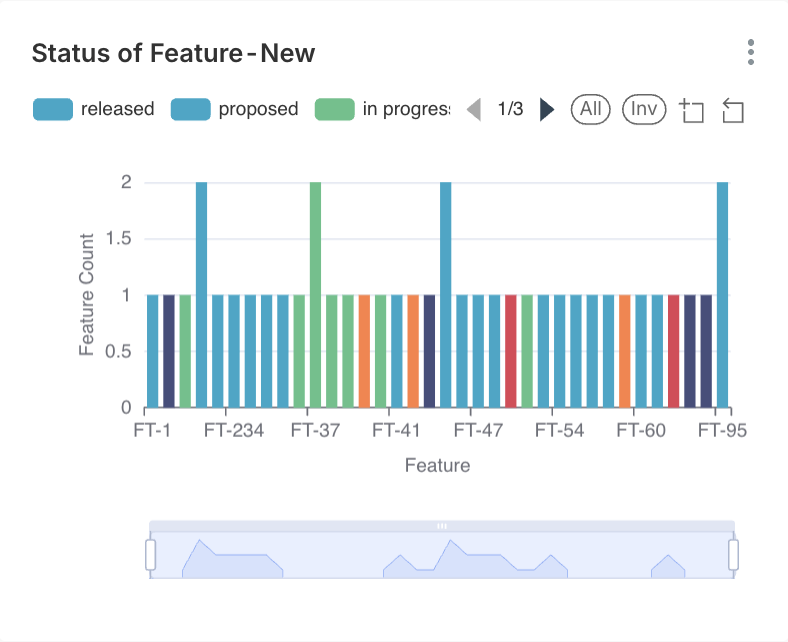
### Status of Feature – New
#### Description
This widget provides a **status-wise breakdown of newly created features**, giving visibility into where features currently stand in their lifecycle.
#### Axis Details
* **X-Axis:** Feature Name / Feature ID
* **Y-Axis:** Count of Features
#### Interpretation
* Features marked **Proposed** indicate upcoming or planned work not yet started.
* **In Progress** features are actively being developed.
* **Released** features are completed and available for use.
A healthy product typically shows:
* A controlled number of proposed features
* A steady movement from In Progress to Released
#### Business & Operational Value
* Helps product owners manage feature pipelines
* Assists leadership in understanding delivery momentum
* Identifies features stalled due to dependencies or prioritization issues
***
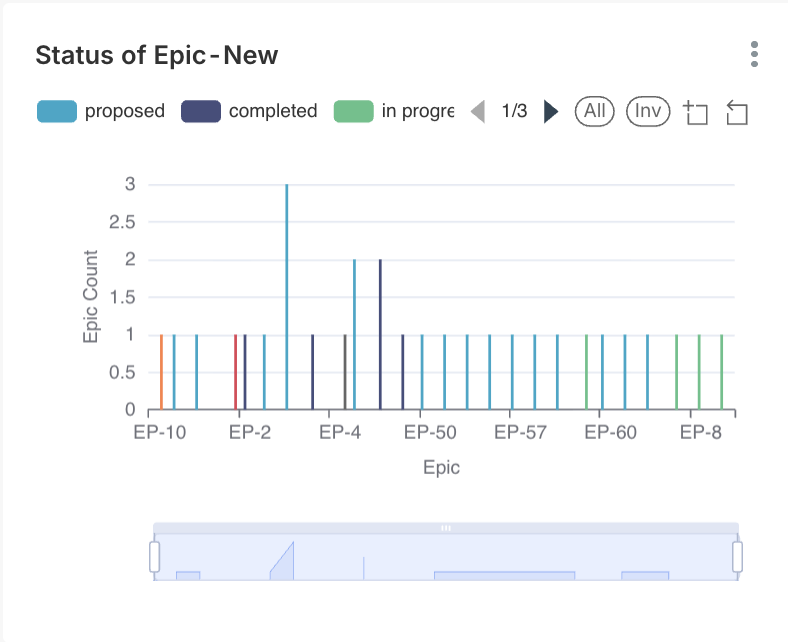
### Status of Epic – New
#### Description
Displays the **current lifecycle status of epics**, which usually represent large business initiatives or major functional areas.
#### Axis Details
* **X-Axis:** Epic Name / Epic ID
* **Y-Axis:** Count of Epics
#### Interpretation
* **Proposed epics** represent strategic ideas or initiatives under evaluation.
* **In Progress epics** are actively broken down into user stories.
* **Completed epics** signal milestone achievement.
Long-running epics remaining in progress may indicate:
* Scope creep
* Cross-team dependencies
* Incomplete story breakdown
#### Business & Operational Value
* Enables high-level roadmap tracking
* Helps align delivery teams with strategic goals
* Supports executive reporting
***
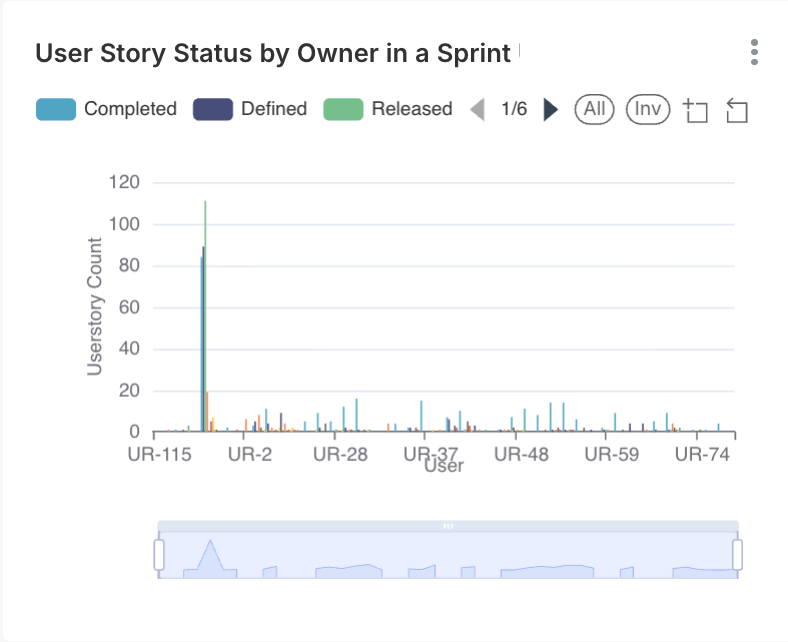
### User Story Status by Owner in a Sprint
#### Description
This widget shows the **distribution of user story statuses grouped by owner** for a selected sprint.
#### Axis Details
* **X-Axis:** User Story Owner
* **Y-Axis:** Number of User Stories
#### Interpretation
Each bar represents an owner and is segmented by story status such as:
* Completed
* Delayed
* Released
This visualization helps identify:
* Uneven workload distribution
* Owners facing repeated delivery delays
#### Business & Operational Value
* Improves accountability and transparency
* Helps scrum masters rebalance workload
* Supports performance and capacity discussions
***
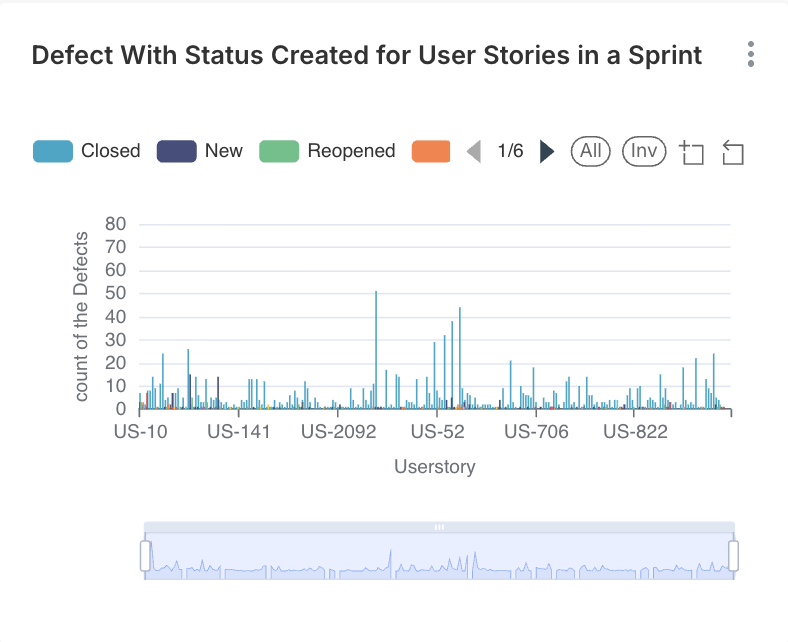
### Defect Status Created for User Stories in a Sprint
#### Description
Tracks **defects raised against user stories** during sprint execution.
#### Axis Details
* **X-Axis:** User Story ID
* **Y-Axis:** Number of Defects
#### Interpretation
* High defect counts against a user story often indicate:
* Ambiguous acceptance criteria
* Incomplete requirements
* Missing edge cases
* Reopened defects signal quality or fix validation issues.
#### Business & Operational Value
* Measures requirement quality
* Enables early identification of unstable stories
* Strengthens collaboration between BA, Dev, and QA teams
***
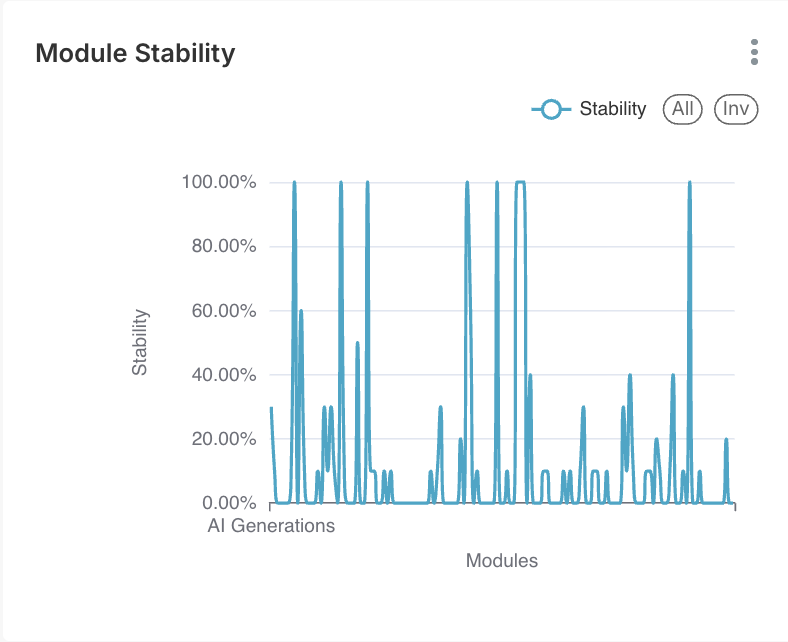
### Module Stability
#### Description
Represents the **stability of application modules** based on how often requirements or implementations change.
#### Axis Details
* **X-Axis:** Module Name
* **Y-Axis:** Stability Percentage (%)
#### Interpretation
* **High stability (80–100%)** → Mature and well-understood module
* **Low stability (<50%)** → Frequent changes, high risk
#### Business & Operational Value
* Guides regression testing scope
* Identifies modules needing redesign or requirement clarification
* Supports release risk assessment
***
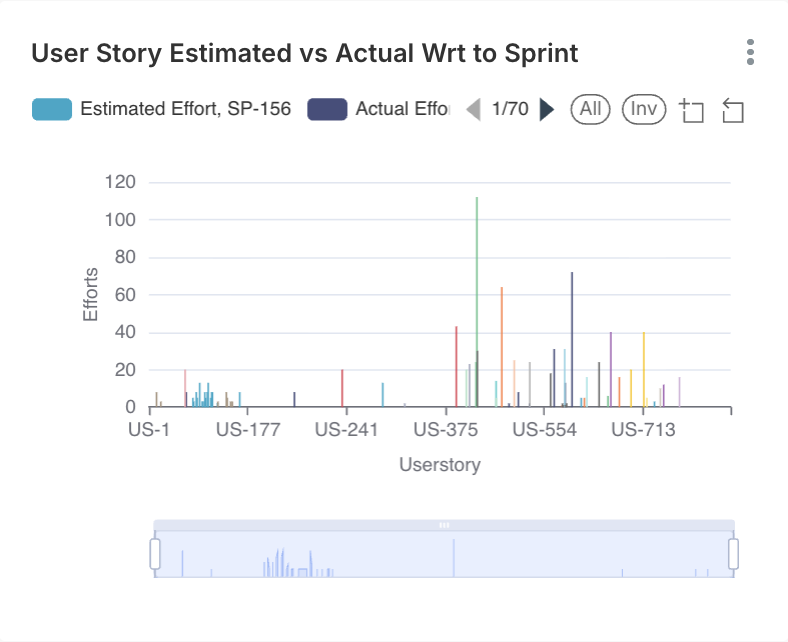
### User Story Estimated vs Actual Work in Sprint
#### Description
Compares **planned effort versus actual effort** spent on each user story.
#### Axis Details
* **X-Axis:** User Story ID
* **Y-Axis:** Effort (Hours / Story Points)
#### Interpretation
* Close alignment = good estimation practices
* Significant variance = scope creep, unplanned work, or technical complexity
#### Business & Operational Value
* Improves sprint planning accuracy
* Enables continuous improvement in estimation techniques
* Helps teams identify recurring planning issues
***
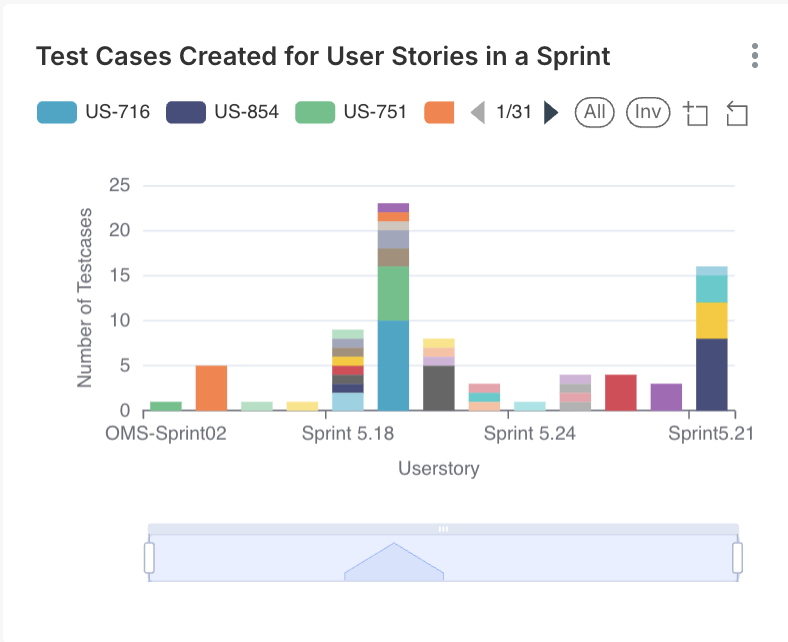
### Test Cases Created for User Stories in a Sprint
#### Description
Displays **test coverage per user story** by showing the number of test cases created.
#### Axis Details
* **X-Axis:** Sprint / User Story ID
* **Y-Axis:** Number of Test Cases
#### Interpretation
* Higher test case count generally reflects:
* Complex logic
* Higher business risk
* Extremely low test case counts may signal insufficient validation.
#### Business & Operational Value
* Ensures adequate QA coverage
* Supports compliance and audit readiness
* Helps QA leads plan testing effort
***
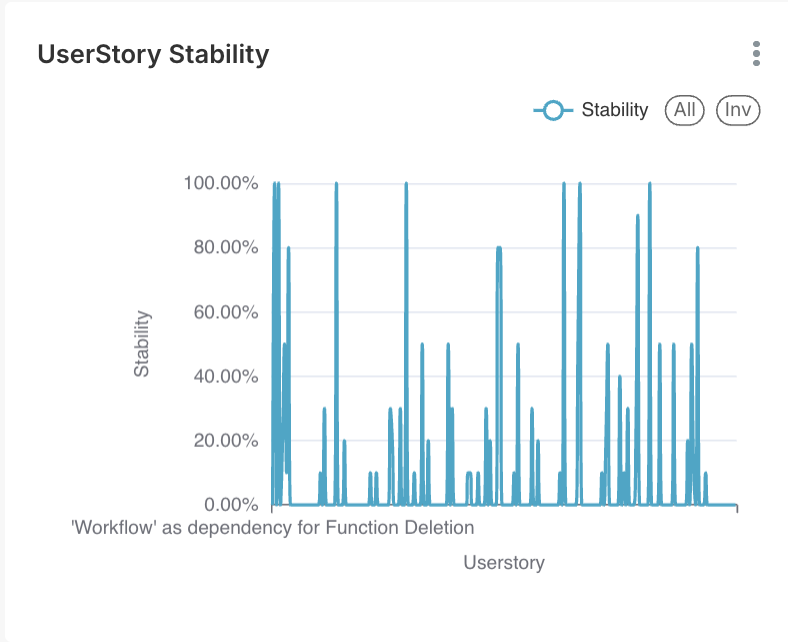
### User Story Stability
#### Description
Measures **how often a user story is modified after creation**, including changes to description, acceptance criteria, or scope.
#### Axis Details
* **X-Axis:** User Story ID
* **Y-Axis:** Stability Percentage (%)
#### Interpretation
* High stability = clear and well-defined requirements
* Low stability = frequent changes, evolving business needs, or unclear expectations
#### Business & Operational Value
* Assesses requirement maturity
* Encourages early stakeholder validation
* Reduces rework and delivery delays
***
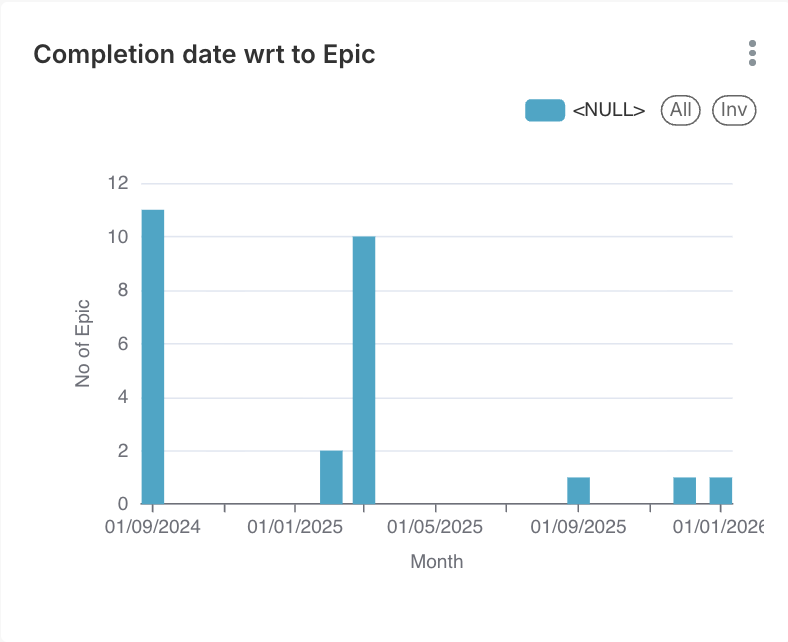
### Completion Date with Respect to Epic
#### Description
Tracks **completion trends over a time period**, such as by epic.
#### Axis Details
* **X-Axis:** Time Period (Epic)
* **Y-Axis:** Number of Items Completed
#### Interpretation
* Consistent completion trends indicate stable velocity.
* Sudden drops highlight blockers or capacity issues.
#### Business & Operational Value
* Supports release forecasting
* Helps identify long-term delivery patterns
***
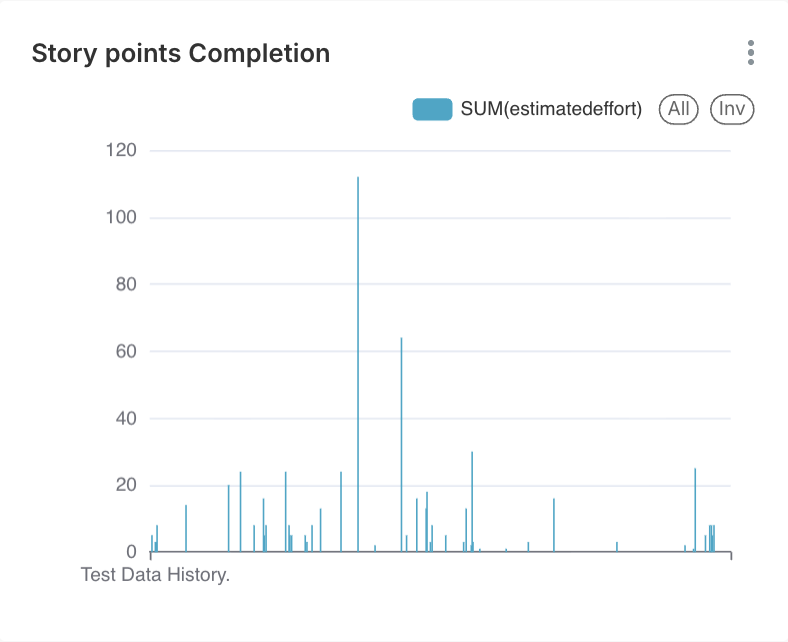
### Story Points Completion
#### Description
Shows **story points assigned and completed**, reflecting effort and complexity.
#### Axis Details
* **X-Axis:** Time Period / User Story
* **Y-Axis:** Story Points
#### Interpretation
* Spikes indicate complex or high-effort stories.
* Consistency reflects mature agile practices.
#### Business & Operational Value
* Measures team velocity
* Improves capacity planning
* Supports agile maturity assessment
***
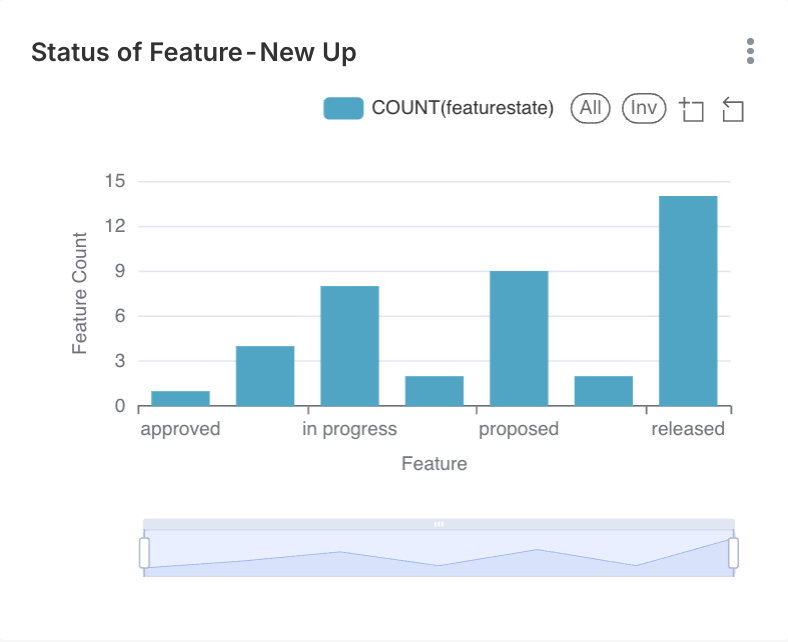
### Status of Feature – New
#### Description
This widget displays the **status-wise distribution of newly created features**, providing visibility into how new features are progressing through their lifecycle.
#### Axis Details
* **X-Axis:** Feature Name / Feature ID
* **Y-Axis:** Count of Features
#### Interpretation
* Each bar represents the **number of features in a specific status**.
* Higher values in **Proposed** indicate a strong backlog pipeline.
* A balanced distribution between **In Progress** and **Released** reflects healthy execution flow.
* Features remaining **In Progress** for extended periods may indicate dependencies or delivery bottlenecks.
#### Business & Operational Value
* Helps track feature readiness and delivery movement
* Supports release and capacity planning
* Identifies stagnation or prioritization gaps early
***
### Key Takeaways & Best Practices
* Stable requirements reduce defects and rework
* Frequent changes should trigger refinement sessions
* Estimation accuracy improves with historical analysis
* Combine defect, stability, and effort metrics for deeper insights
---
# Agent Instructions
This documentation is published with GitBook. GitBook is the documentation platform designed so that both humans and AI agents can read, navigate, and reason over technical content effectively. Learn more at gitbook.com.
## Querying This Documentation
If you need additional information that is not directly available in this page, you can query the documentation dynamically by asking a question.
Perform an HTTP GET request on the current page URL with the `ask` query parameter, and the optional `goal` query parameter:
```
GET https://docs.simplifyqa.ai/dashboard/requirement-dashboard-guide.md?ask=&goal=
```
`ask` is the immediate question: it should be specific, self-contained, and written in natural language.
`goal` is optional and describes the broader end goal you are ultimately trying to accomplish on behalf of the user. GitBook uses it to tailor the answer towards what is most useful for that goal.
The response will contain a direct answer to the question and relevant excerpts and sources from the documentation.
Use this mechanism when the answer is not explicitly present in the current page, you need clarification or additional context, or you want to retrieve related documentation sections.