> For the complete documentation index, see [llms.txt](https://docs.simplifyqa.ai/llms.txt). Markdown versions of documentation pages are available by appending `.md` to page URLs; this page is available as [Markdown](https://docs.simplifyqa.ai/dashboard/defect-dashboard-guide.md).
# Defect Dashboard Guide
Welcome to the **Defect Management Dashboard – Widgets & Reports Help Guide**. This document explains how to **read, interpret, and use** each dashboard widget effectively. It is designed for **clients, business stakeholders, QA teams, developers, product owners, and management** to ensure consistent understanding of quality metrics and reporting.
The dashboard converts raw defect data into actionable insights that help assess **release readiness, product stability, team performance, and production risk**.
### How to Use Dashboard Graphs (Common Instructions for All Widgets)
Every widget on the dashboard includes a standard **three-dot (⋮) menu** in the top-right corner. These options behave the same across all graphs.
* **Force Refresh:** Reloads the widget with the latest data. Always use this before reviews or release decisions.
* **Enter Fullscreen:** Expands the graph for better visibility during meetings or presentations.
* **Edit Chart:** Allows authorized users to modify filters, grouping, or metrics.
* **Cross-Filtering Scoping:** Selecting data in one widget automatically filters related widgets for deeper analysis.
* **View Query:** Displays the underlying logic or query used to generate the graph (mainly for admins/audits).
* **View as Table:** Converts the graph into a table to view exact counts and records.
* **Drill to Detail:** Opens individual defect records contributing to the graph.
* **Share:** Generates shareable links or embedded views.
* **Download:** Exports the graph or data as Image, PDF, or CSV/Excel.
### Defect Status
* **New:** Defect logged and awaiting review.
* **Open:** Defect accepted and ready to be worked on.
* **In Progress:** Defect actively being fixed.
* **Fixed / Resolved:** Fix completed and pending QA verification.
* **Retest:** Defect ready for validation.
* **Closed:** Fix verified and completed.
* **Reopened:** Issue persists after closure.
* **Rejected:** Invalid or duplicate defect.
* **Deferred:** Fix postponed to a future release.
***
### Quality & Stability Metrics
These widgets help determine **overall product health and release readiness**.
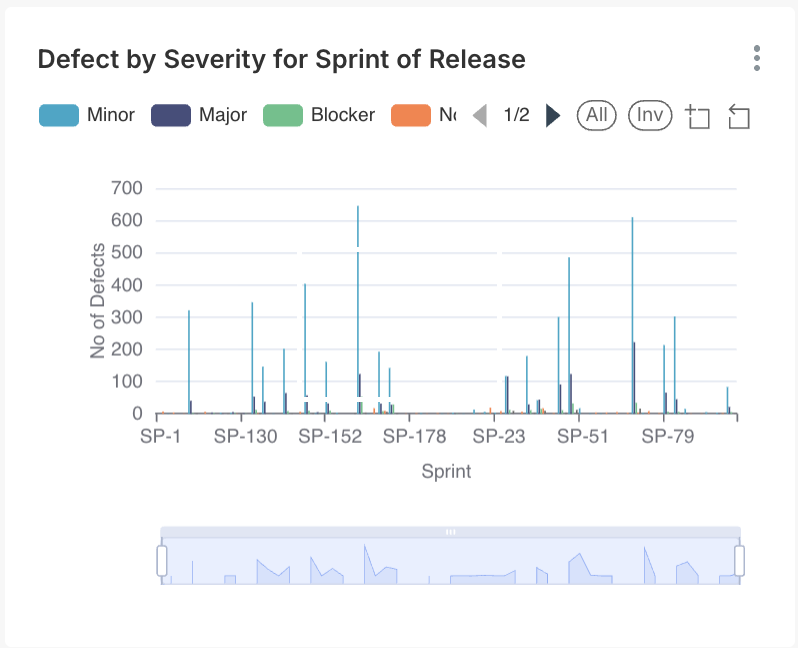
#### 1. Defect by Severity for Sprint of Release
**Purpose**\
This widget helps evaluate the **technical risk and stability** of each sprint or release by classifying defects based on their impact on the system. It is one of the most critical graphs for **release readiness decisions**.
**Axis Breakdown**
* **X-Axis (Horizontal):** Sprint or Release identifiers (e.g., SP-1, SP-130, SP-152). Each bar represents one sprint.
* **Y-Axis (Vertical):** Total number of defects logged in that sprint.
**How to Read the Graph**
* Each sprint is represented by a vertical bar.
* The bar is divided into color-coded segments, each representing a severity level (Minor, Major, Blocker, Critical).
* The total height of the bar equals the total number of defects in that sprint.
**How to Interpret**
* **Blocker/Critical present:** Sprint is unstable and not suitable for release.
* **Major-dominated bars:** Core functionality issues exist.
* **Minor-heavy bars:** Indicates polish and usability issues rather than functional risk.
* **Trend analysis:** Decreasing bar height across sprints shows improving quality maturity.
**Business & QA Actions**
* Stop release if Blocker/Critical defects exist.
* Prioritize root cause analysis for sprints with repeated high Major defects.
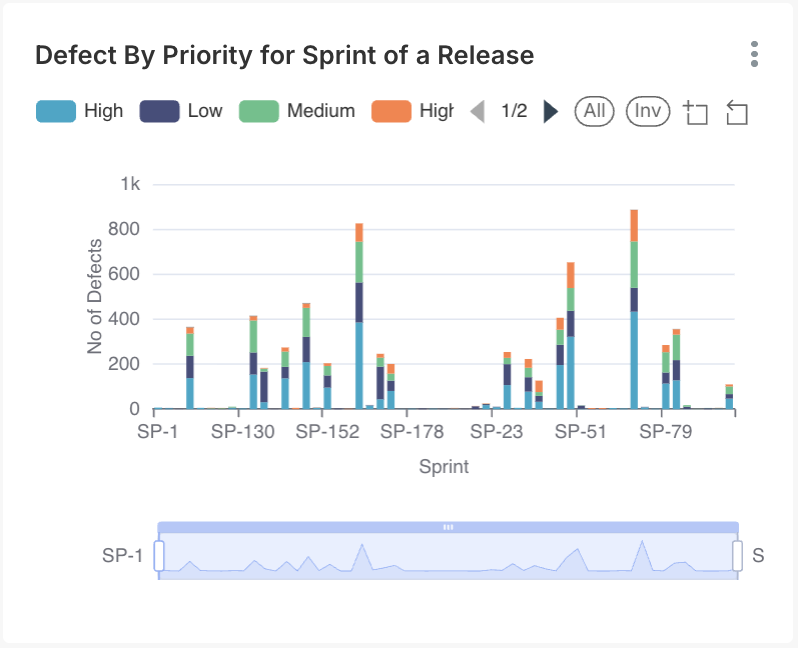
#### 2. Defect by Priority for Sprint of a Release
**Purpose**\
This widget represents defects categorized by **business urgency**, helping teams understand what must be fixed immediately versus what can be deferred.
**Axis Breakdown**
* **X-Axis:** Sprint identifiers.
* **Y-Axis:** Number of defects.
**How to Read the Graph**
* Each bar represents a sprint.
* Color segments represent priority levels (High, Medium, Low).
**How to Interpret**
* **High-priority-heavy bars:** Immediate business risk.
* **Consistent High priority across sprints:** Indicates planning or requirement clarity issues.
* **Medium/Low dominance:** Indicates manageable backlog.
**Business & QA Actions**
* High priority defects must be resolved before sprint sign-off.
* Review prioritization rules if High-priority backlog persists.
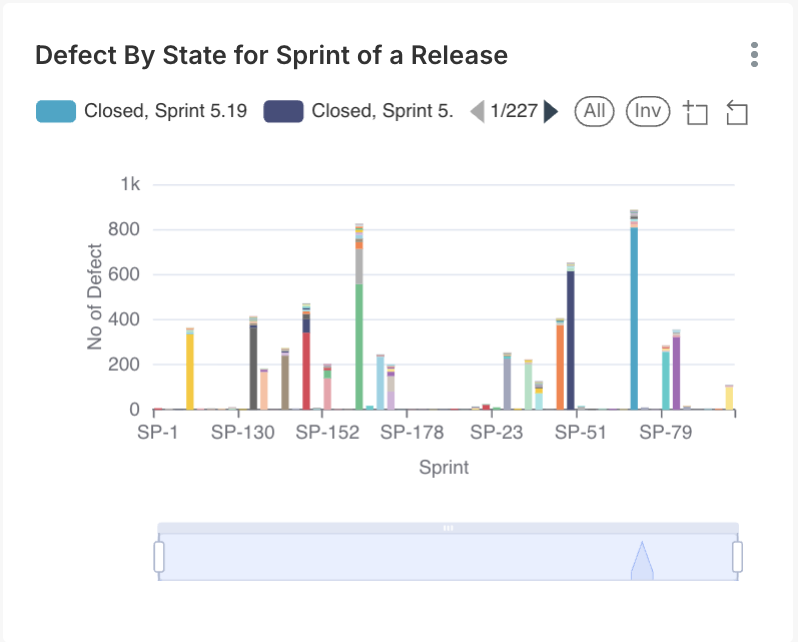
#### 3. Defect by State for Sprint of a Release
**Purpose**\
This widget tracks how efficiently defects move through their lifecycle within and across sprints.
**Axis Breakdown**
* **X-Axis:** Sprint identifiers.
* **Y-Axis:** Defect count.
**How to Read the Graph**
* Each bar is segmented by defect state (New, In Progress, Fixed, Closed, etc.).
* Distribution shows where defects are currently stuck.
**How to Interpret**
* **High Closed:** Healthy sprint completion.
* **High New late in sprint:** Late discovery risk.
* **High In Progress:** Development bottlenecks.
**Business & QA Actions**
* Use this graph in daily standups to unblock work.
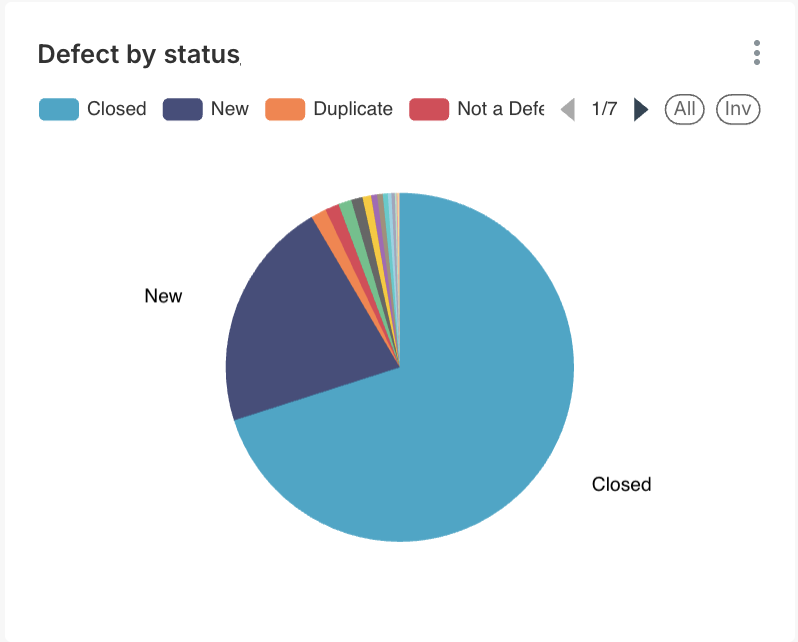
#### 4. Defect Distribution (Pie Chart)
**Purpose**\
Provides a high-level snapshot of the **overall defect backlog health** at any point in time.
**How to Read the Graph**
* Each slice represents a defect status.
* Slice size corresponds to percentage of total defects.
**How to Interpret**
* **Closed dominant:** Stable product.
* **New/Open dominant:** Growing backlog and risk.
* **Reopened visible:** Fix quality issues.
**Business & QA Actions**
* Use during leadership reviews for quick decision-making.
***
## Team Performance & Workload
These widgets ensure **balanced workload and efficient delivery**.
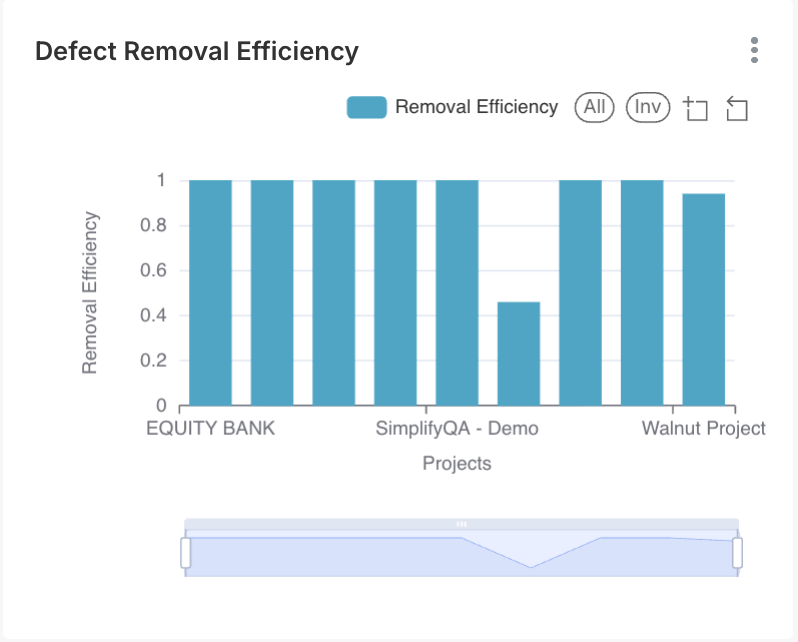
#### 5. Defect Removal Efficiency (DRE)
**Purpose**\
Measures how effectively defects are caught **before production**.
**Axis Breakdown**
* **X-Axis:** Project names
* **Y-Axis:** Efficiency score (0–1)
**How to Read the Graph**
* Taller bars = better defect prevention
**How to Interpret**
* Near 1.0 → Strong QA process
* Below 0.6 → High production leakage
**Business & QA Actions**
* Strengthen regression & automation for low DRE projects
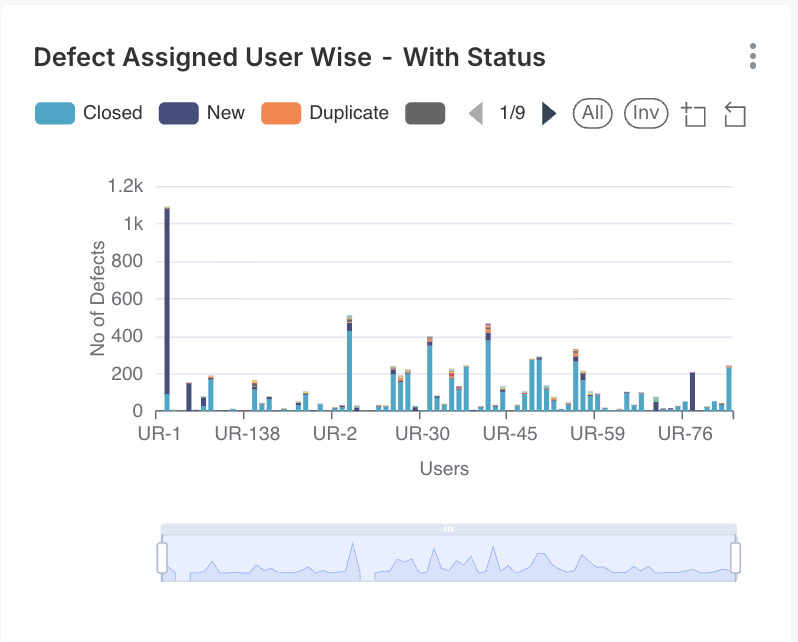
#### 6. Defect Assigned User Wise with Status
**Purpose**\
Visualizes **workload distribution** across team members.
**Axis Breakdown**
* **X-Axis:** User names
* **Y-Axis:** Assigned defect count
**How to Read the Graph**
* Taller bars = higher workload
**How to Interpret**
* Uneven bars → Burnout or bottlenecks
* High In Progress → Skill dependency
**Business & QA Actions**
* Redistribute work
* Enable cross-training
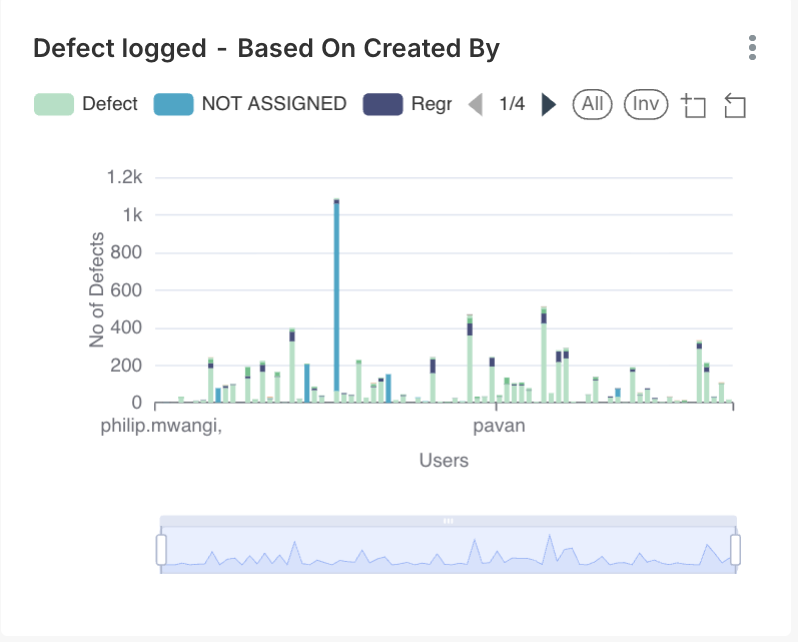
#### 7. Defect Logged Based on Created By
**Purpose**\
Shows **who is discovering defects**.
**Axis Breakdown**
* **X-Axis:** Creator name
* **Y-Axis:** Defect count
**How to Read the Graph**
* Taller bars = higher contribution
**How to Interpret**
* High QA → Strong testing
* Developer entries → Shift-left quality
**Business & QA Actions**
* Encourage dev-side validation
* Recognize top contributors
***
## Functional & Technical Analysis
These graphs identify **application weak spots**.
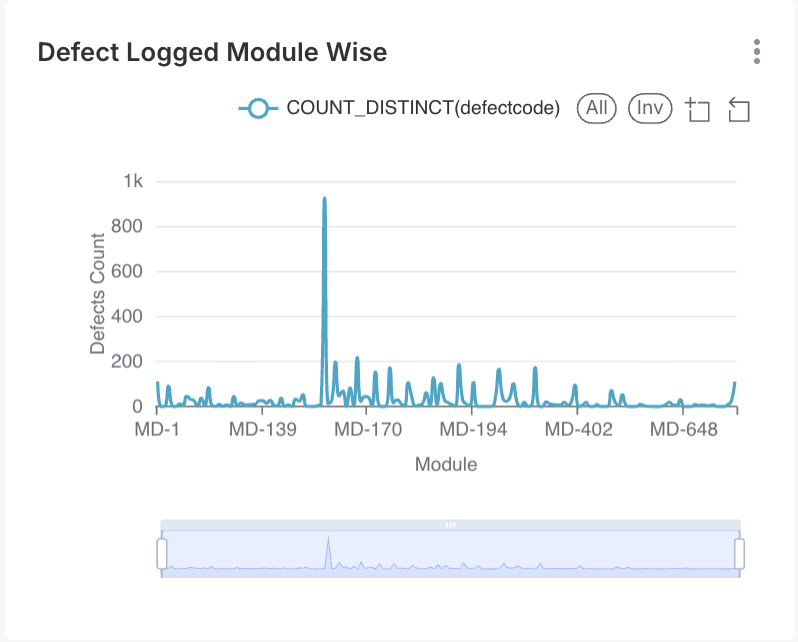
#### 8. Defect Logged Module Wise
**Purpose**\
Identifies **modules with high defect density**.
**Axis Breakdown**
* **X-Axis:** Module names
* **Y-Axis:** Defect count
**How to Interpret**
* Tall bars → Technical hotspots
**Business & QA Actions**
* Increase regression coverage
* Consider refactoring
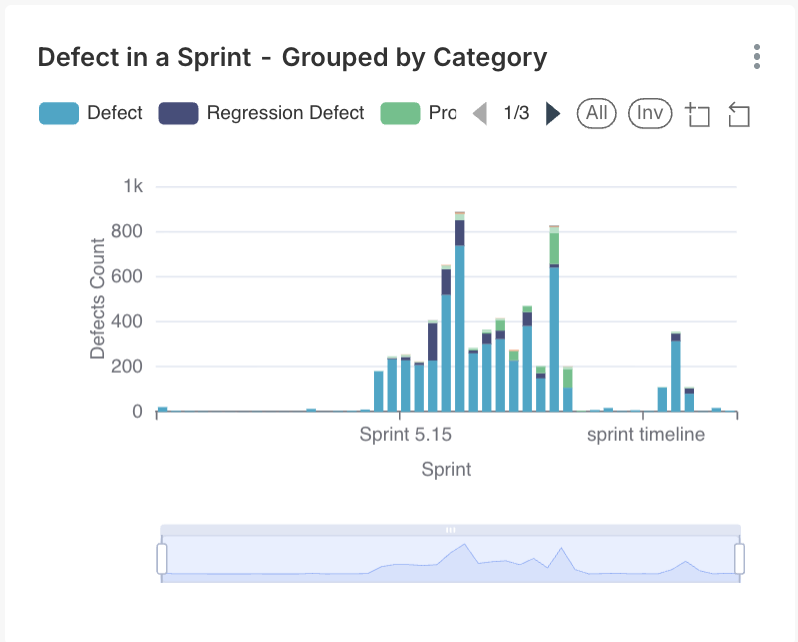
#### 9. Defect in a Sprint Grouped by Category
**Purpose**\
Classifies defects by **technical type** (UI, DB, Logic).
**Axis Breakdown**
* **X-Axis:** Categories
* **Y-Axis:** Defect count
**How to Interpret**
* UI-heavy → Need UI automation
* Logic-heavy → Code/design issues
**Business & QA Actions**
* Adjust testing strategy accordingly
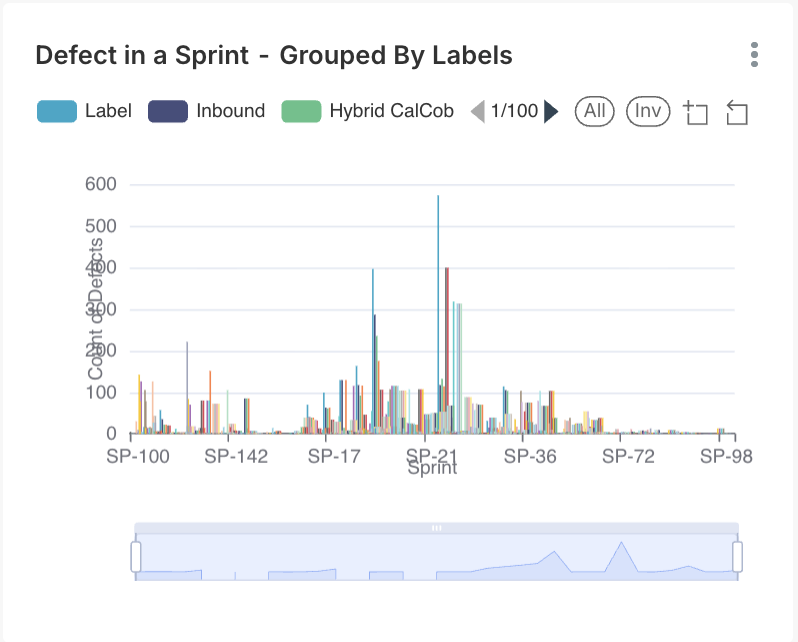
#### 10. Defect in a Sprint Grouped by Labels
**Purpose**\
Tracks defects using **custom tags**.
**How to Interpret**
* Useful for audits, hotfix tracking, regression cycles
**Business & QA Actions**
* Use labels consistently for reporting accuracy
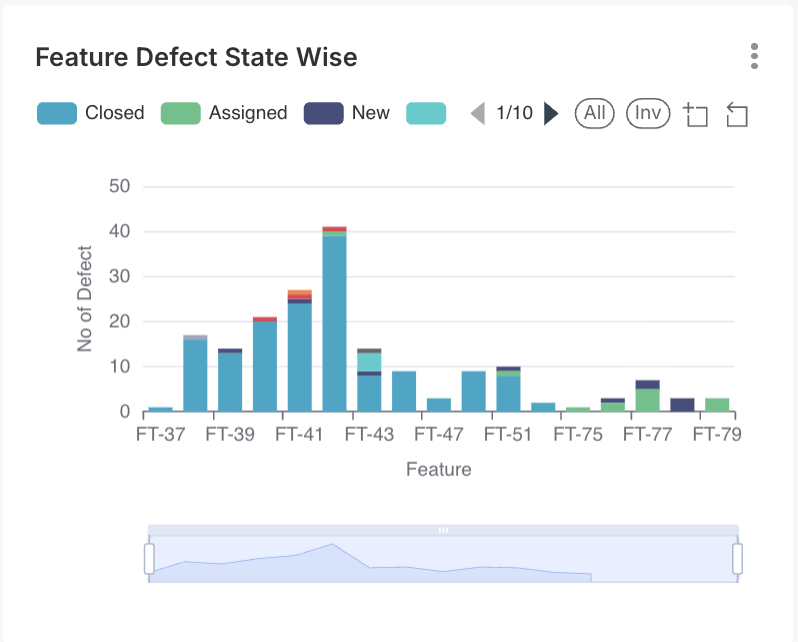
#### 11. Feature Defect State Wise
**Purpose**\
Measures defect health at the **feature level**.
**Axis Breakdown**
* **X-Axis:** Feature names
* **Y-Axis:** Defect count
**How to Interpret**
* High open defects → Feature instability
**Business & QA Actions**
* Delay feature enablement
#### 12. Epic Defect State Wise
**Purpose**\
Provides a **strategic quality view** by Epic.
**Axis Breakdown**
* **X-Axis:** Epic codes
* **Y-Axis:** Defect count
**How to Interpret**
* High defects → Roadmap risk
**Business & QA Actions**
* Use in release planning
***
## Requirements & User Stories
Captures and documents what the system must do from the user’s perspective to guide development.
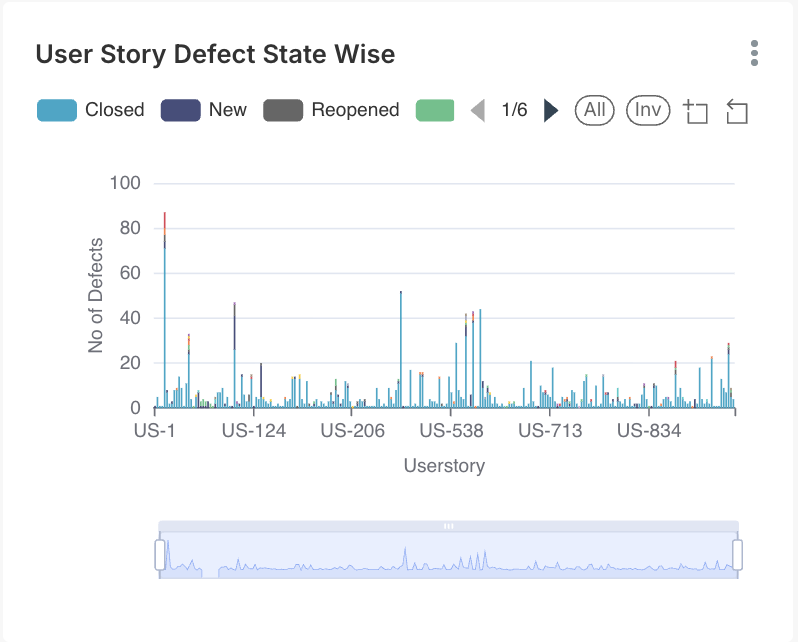
#### 13. User Story Defect State Wise (Chart)
**Purpose**\
Identifies **high-risk user stories**.
**Axis Breakdown**
* **X-Axis:** User Story IDs
* **Y-Axis:** Defect count
**How to Interpret**
* High counts → Design or acceptance gaps
**Business & QA Actions**
* Review acceptance criteria
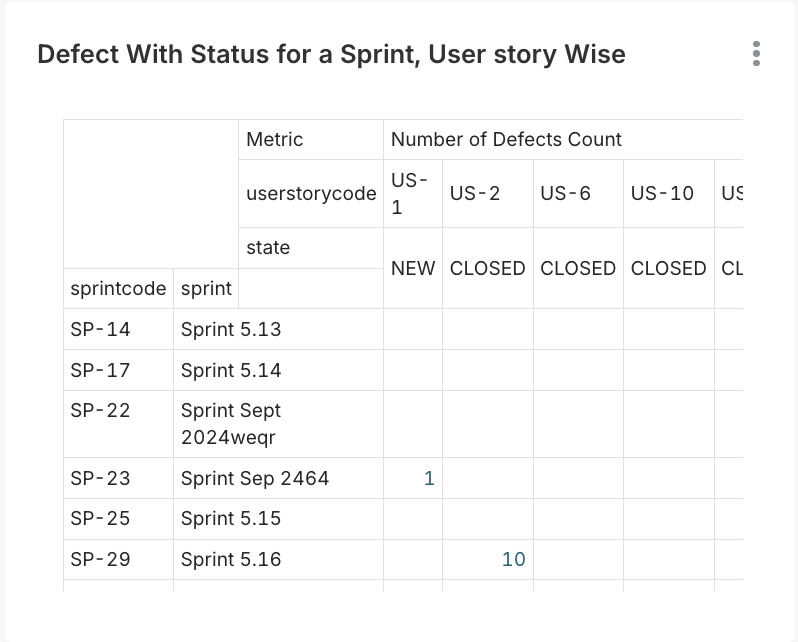
#### 14. Defect with Status for a Sprint – User Story Wise (Table)
**Purpose**\
Provides **detailed defect-to-story mapping**.
**How to Interpret**
* Analyze patterns during retrospectives
**Business & QA Actions**
* Improve story refinement
***
## Execution & Production Monitoring
Tracks system performance and operations to ensure smooth execution and timely issue detection.
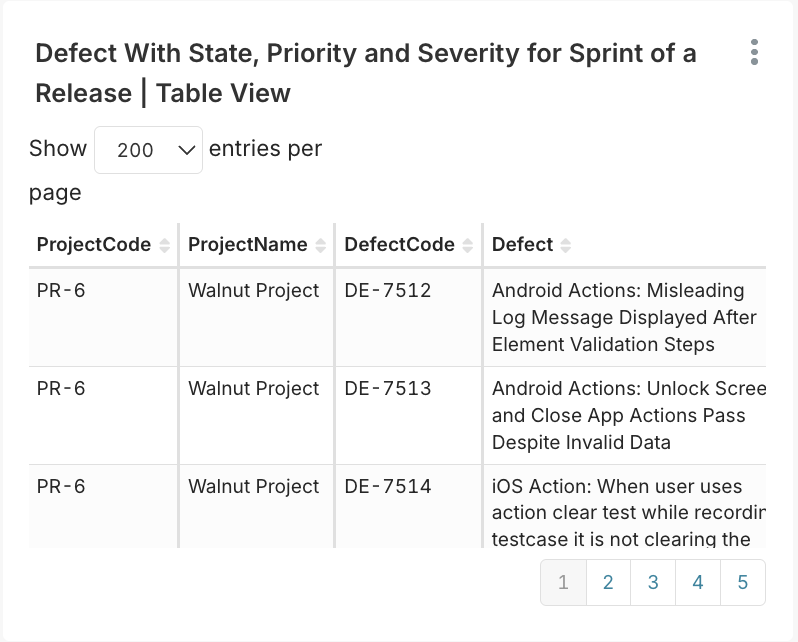
#### 15. Defect with State, Priority and Severity (Detailed Grid)
**Purpose**\
Acts as the **master defect list** for daily triage.
**How to Interpret**
* Review row-by-row for execution decisions
**Business & QA Actions**
* Use in daily triage meetings
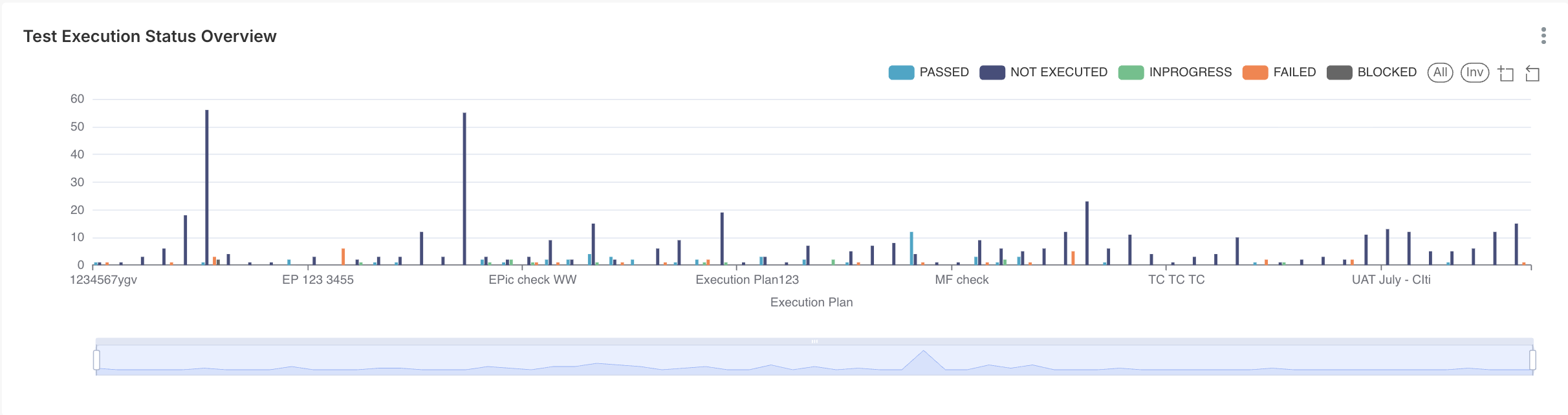
#### 16. Test Execution Status Overview
**Purpose**\
Tracks **testing progress**, independent of defects.
**How to Interpret**
* High Not Executed → Schedule risk
* High Failed → Product instability
**Business & QA Actions**
* Re-plan testing timelines
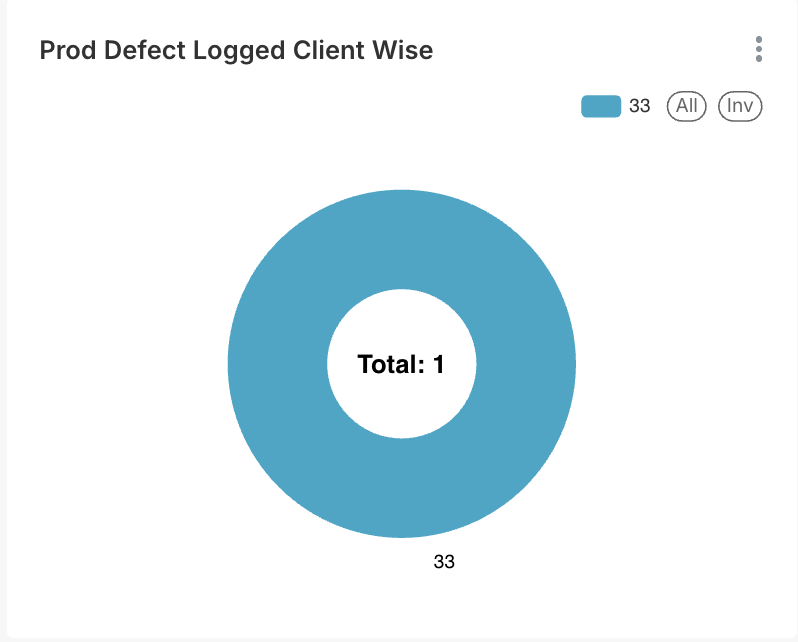
#### 17. Production Defect Logged – Client Wise
**Purpose**\
Tracks **escaped defects** reported by clients.
**Axis Breakdown**
* **X-Axis:** Client names
* **Y-Axis:** Defect count
**How to Interpret**
* Any value > 0 = Quality escape
**Business & QA Actions**
* Immediate RCA and prevention
***
### Final Takeaway
This dashboard is a **decision-support system**, not just a report.\
When interpreted correctly, it enables **faster releases, higher quality, and stronger client trust**.
---
# Agent Instructions
This documentation is published with GitBook. GitBook is the documentation platform designed so that both humans and AI agents can read, navigate, and reason over technical content effectively. Learn more at gitbook.com.
## Querying This Documentation
If you need additional information that is not directly available in this page, you can query the documentation dynamically by asking a question.
Perform an HTTP GET request on the current page URL with the `ask` query parameter, and the optional `goal` query parameter:
```
GET https://docs.simplifyqa.ai/dashboard/defect-dashboard-guide.md?ask=&goal=
```
`ask` is the immediate question: it should be specific, self-contained, and written in natural language.
`goal` is optional and describes the broader end goal you are ultimately trying to accomplish on behalf of the user. GitBook uses it to tailor the answer towards what is most useful for that goal.
The response will contain a direct answer to the question and relevant excerpts and sources from the documentation.
Use this mechanism when the answer is not explicitly present in the current page, you need clarification or additional context, or you want to retrieve related documentation sections.