> For the complete documentation index, see [llms.txt](https://docs.simplifyqa.ai/llms.txt). Markdown versions of documentation pages are available by appending `.md` to page URLs; this page is available as [Markdown](https://docs.simplifyqa.ai/dashboard/release-dashboard-guide.md).
# Release Dashboard Guide
The **Release Management Dashboard** provides consolidated visibility into **release readiness, defect risk, execution quality, and sprint health** leading up to a release.
It helps teams:
* Assess release stability and risk
* Track open and leaked defects
* Monitor test execution coverage for releases
* Analyze sprint-level quality and effort trends
* Make informed go / no-go release decisions
This dashboard is primarily used by **Release Managers, QA Leads, Product Owners, Delivery Managers, and Senior Stakeholders** during sprint reviews and release checkpoints.
### How to Use Dashboard Graphs (Common Instructions for All Widgets)
Every widget on the dashboard includes a standard **three-dot (⋮) menu** in the top-right corner. These options behave the same across all graphs.
* **Force Refresh:** Reloads the widget with the latest data. Always use this before reviews or release decisions.
* **Enter Fullscreen:** Expands the graph for better visibility during meetings or presentations.
* **Edit Chart:** Allows authorized users to modify filters, grouping, or metrics.
* **Cross-Filtering Scoping:** Selecting data in one widget automatically filters related widgets for deeper analysis.
* **View Query:** Displays the underlying logic or query used to generate the graph (mainly for admins/audits).
* **View as Table:** Converts the graph into a table to view exact counts and records.
* **Drill to Detail:** Opens individual defect records contributing to the graph.
* **Share:** Generates shareable links or embedded views.
* **Download:** Exports the graph or data as Image, PDF, or CSV/Excel.
***
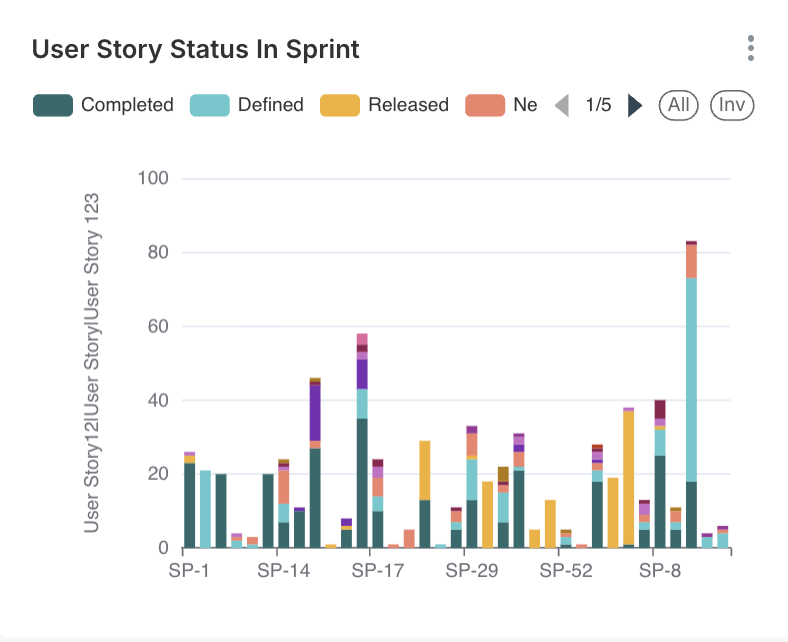
### User Story Status in Sprint
#### Description
Displays the **status distribution of user stories** within a selected sprint.
#### Axis Details
* **X-Axis:** User Story ID
* **Y-Axis:** Number of User Stories
#### Status Classification
* Completed
* Defined
* Released
* New
#### Interpretation
* A higher **Completed** count indicates strong sprint closure.
* Many **New or Defined** stories late in the sprint may indicate scope creep.
#### Business & Operational Value
* Assesses sprint completion health
* Helps determine sprint readiness for release
* Highlights planning vs execution gaps
***
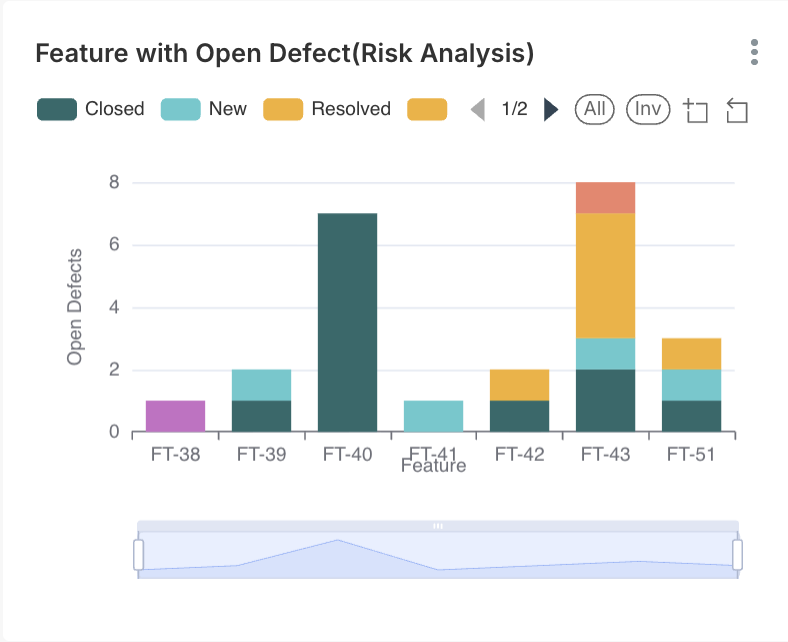
### Feature with Open Defect (Risk Analysis)
#### Description
Shows **features that currently have open defects**, highlighting release risk areas.
#### Axis Details
* **X-Axis:** Feature Name / Feature ID
* **Y-Axis:** Number of Open Defects
#### Interpretation
* Features with higher open defect counts represent **high-risk release components**.
* Even a single critical defect can block a feature from release.
#### Business & Operational Value
* Supports risk-based release decisions
* Helps prioritize defect closure
* Identifies features needing additional validation
***
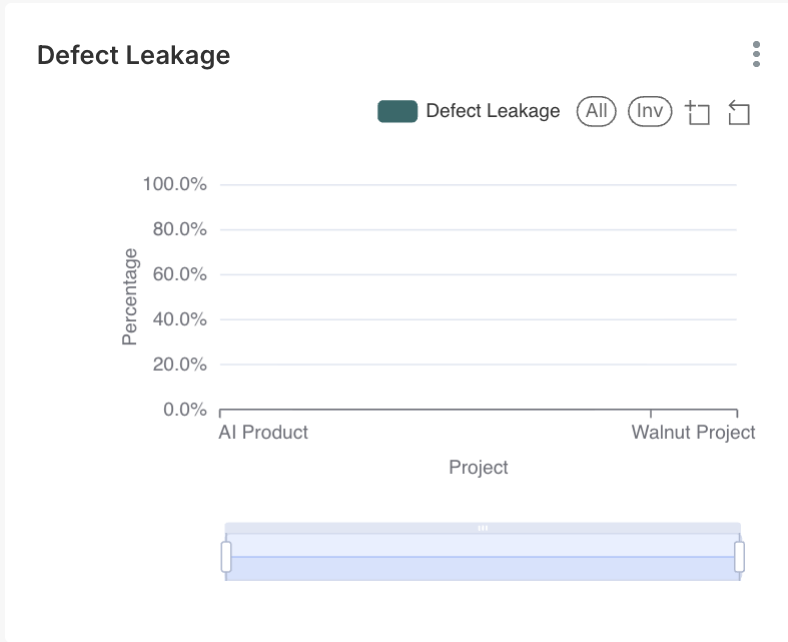
### Defect Leakage
#### Description
Displays **defects that escaped into later stages** (for example, production or UAT).
#### Axis Details
* **X-Axis:** Project
* **Y-Axis:** Defect Leakage Percentage (%)
#### Interpretation
* Higher leakage indicates gaps in test coverage or environment validation.
* Zero or near-zero leakage reflects strong QA effectiveness.
#### Business & Operational Value
* Measures test effectiveness
* Supports continuous improvement initiatives
* Reduces production incidents
***
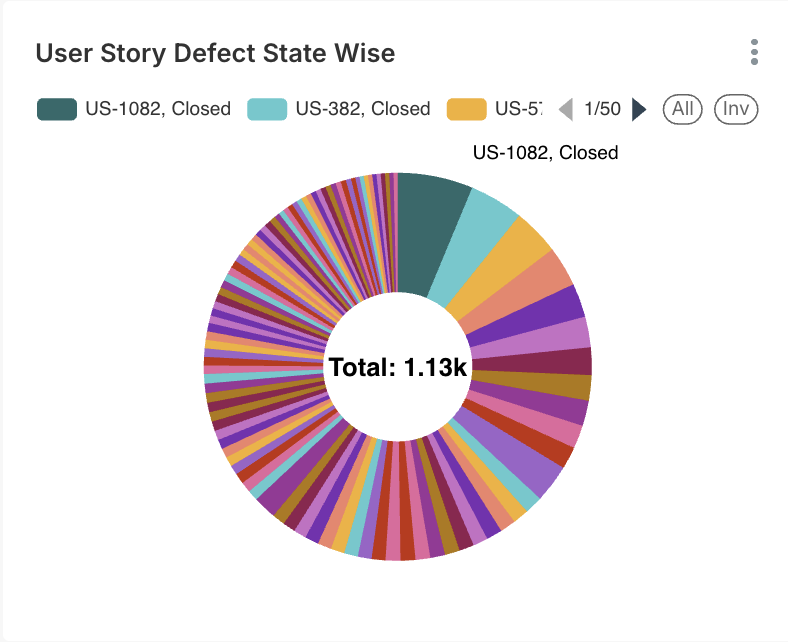
### User Story Defect State Wise
#### Description
Shows **defect distribution across user stories**, categorized by defect state.
#### Axis Details
* **X-Axis:** User Story ID
* **Y-Axis:** Number of Defects
#### Interpretation
* Stories with multiple open or reopened defects may require re-analysis.
* Closed defects indicate stabilization.
#### Business & Operational Value
* Evaluates requirement quality
* Identifies unstable user stories
* Supports focused regression testing
***
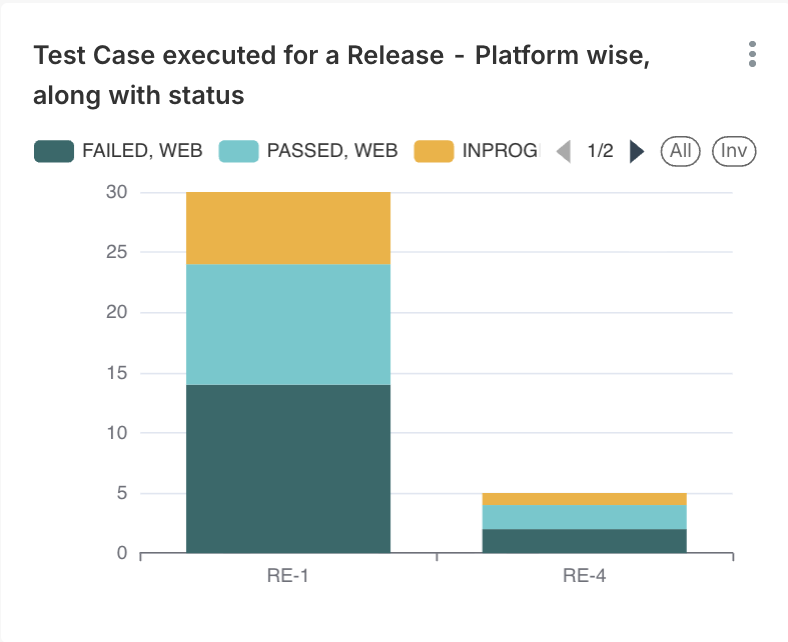
### Test Case Executed for a Release – Platform Wise with Status
#### Description
Displays **test case execution results for a release**, grouped by platform.
#### Axis Details
* **X-Axis:** Release / Platform (Web, Mobile, etc.)
* **Y-Axis:** Count of Test Cases
#### Status Classification
* Passed
* Failed
* In Progress
#### Interpretation
* High pass percentage across platforms indicates release readiness.
* Platform-specific failures highlight compatibility risks.
#### Business & Operational Value
* Ensures cross-platform coverage
* Supports release certification
* Reduces post-release issues
***
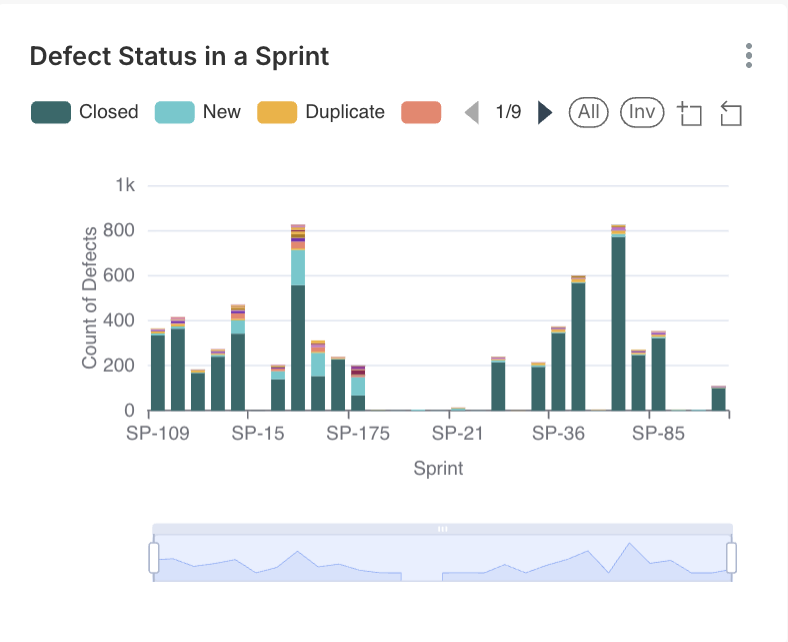
### Defect Status in a Sprint
#### Description
Shows **defect distribution by status** within a sprint.
#### Axis Details
* **X-Axis:** Sprint
* **Y-Axis:** Number of Defects
#### Status Classification
* Closed
* Open
* Duplicate
#### Interpretation
* A rising **Closed** trend shows stabilization.
* High **Open** defects late in sprint indicate release risk.
#### Business & Operational Value
* Sprint quality assessment
* Supports sprint exit decisions
***
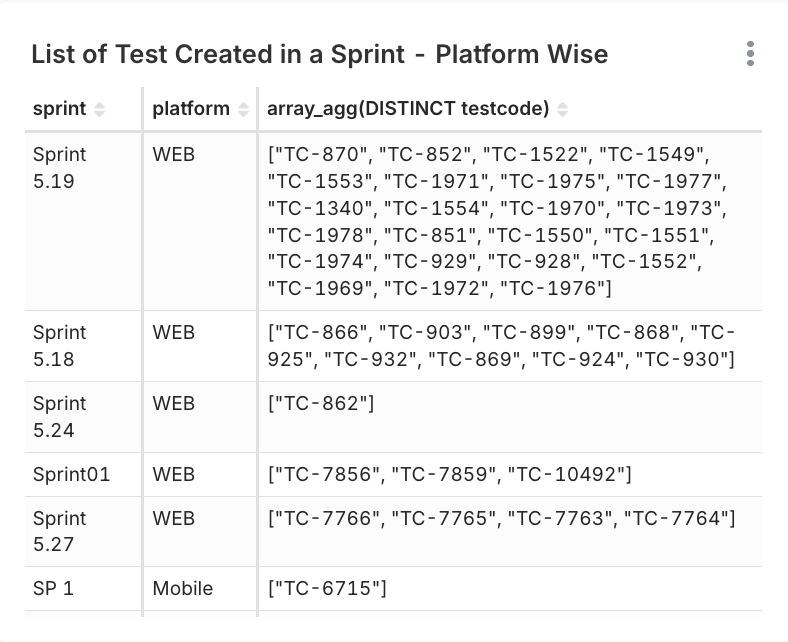
### List of Test Cases in a Sprint – Platform Wise
#### Description
Displays a **tabular list of executed test cases**, grouped by sprint and platform.
#### Data Fields Explained
* Sprint Name
* Platform (Web / Mobile)
* Test Case ID
#### Interpretation
Ensures visibility into platform-specific execution coverage.
#### Business & Operational Value
* Validates execution completeness
* Supports audit and compliance needs
***
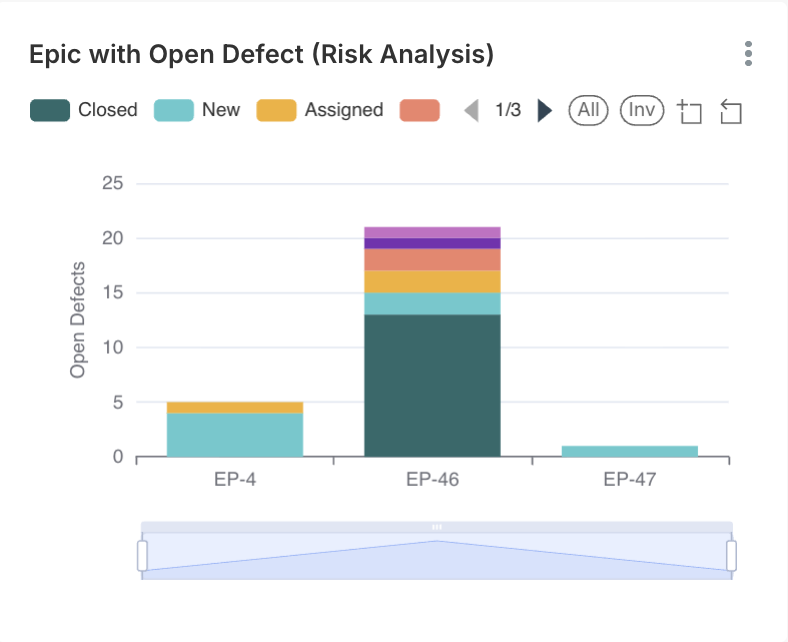
### Epic with Open Defect (Risk Analysis)
#### Description
Shows **epics that contain open defects**, indicating higher release risk.
#### Axis Details
* **X-Axis:** Epic ID
* **Y-Axis:** Number of Open Defects
#### Interpretation
* Epics with open defects should be carefully reviewed before release.
#### Business & Operational Value
* High-level risk analysis
* Helps leadership make informed go / no-go decisions
***
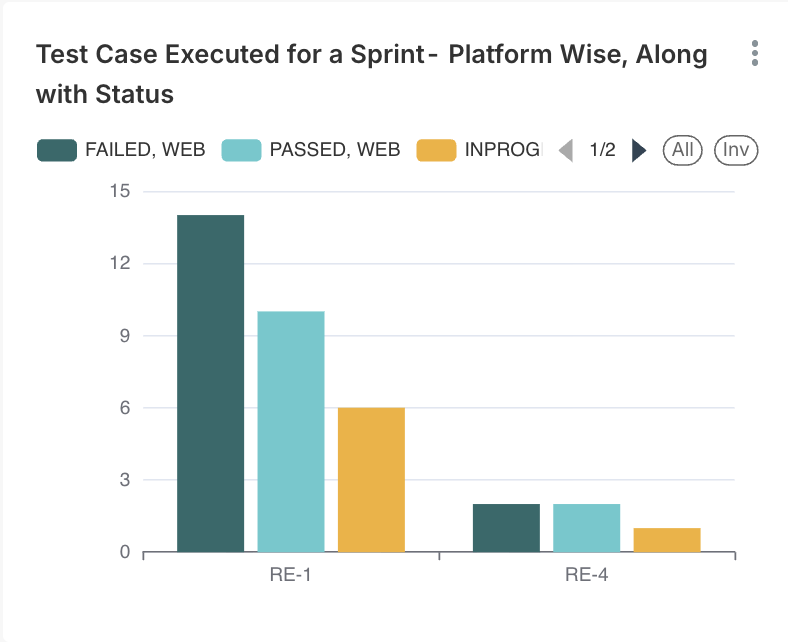
### Test Case Executed for a Sprint – Platform Wise with Status
#### Description
Displays **test execution results for a sprint**, grouped by platform.
#### Axis Details
* **X-Axis:** Sprint / Platform
* **Y-Axis:** Count of Test Cases
#### Interpretation
* Balanced execution across platforms indicates good test planning.
* Platform gaps may delay release sign-off.
#### Business & Operational Value
* Sprint execution completeness
* Platform coverage validation
***
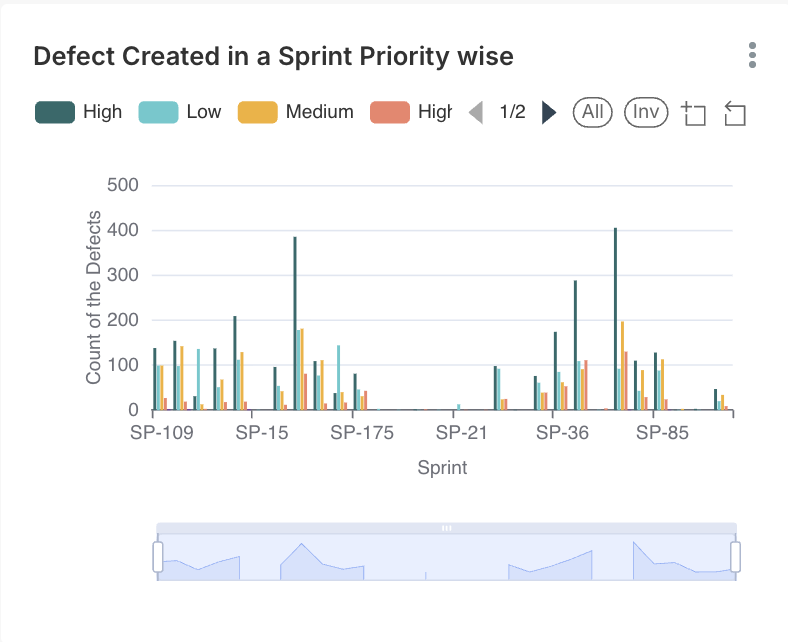
### Defect Created in a Sprint – Priority Wise
#### Description
Shows **defects created during a sprint**, categorized by priority.
#### Axis Details
* **X-Axis:** Sprint
* **Y-Axis:** Number of Defects
#### Priority Classification
* High
* Medium
* Low
#### Interpretation
* High-priority defect spikes signal quality risks.
#### Business & Operational Value
* Risk assessment
* Sprint quality monitoring
***
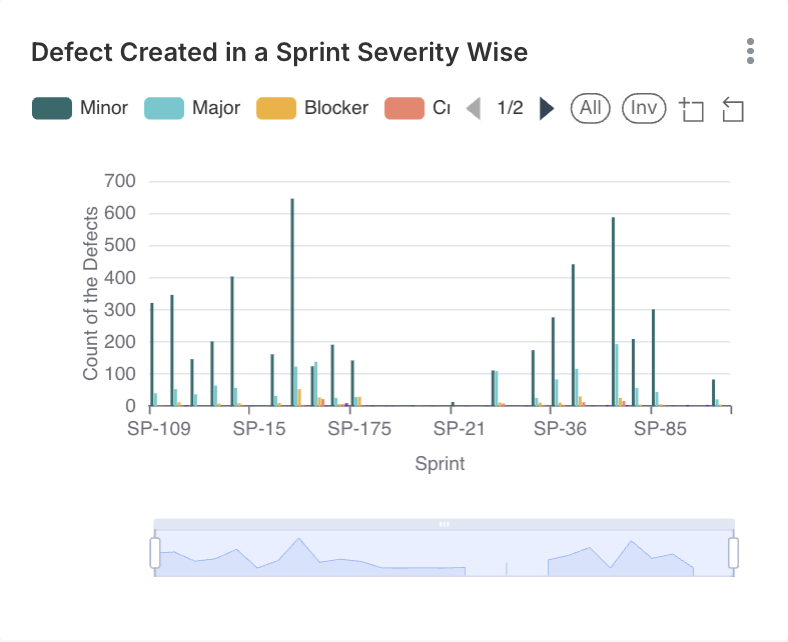
### Defect Created in a Sprint – Severity Wise
#### Description
Displays **defect distribution by severity** for a sprint.
#### Axis Details
* **X-Axis:** Sprint
* **Y-Axis:** Number of Defects
#### Severity Classification
* Blocker
* Critical
* Major
* Minor
#### Interpretation
* Blocker and Critical defects directly impact release readiness.
#### Business & Operational Value
* Release gating decisions
* Quality trend analysis
***
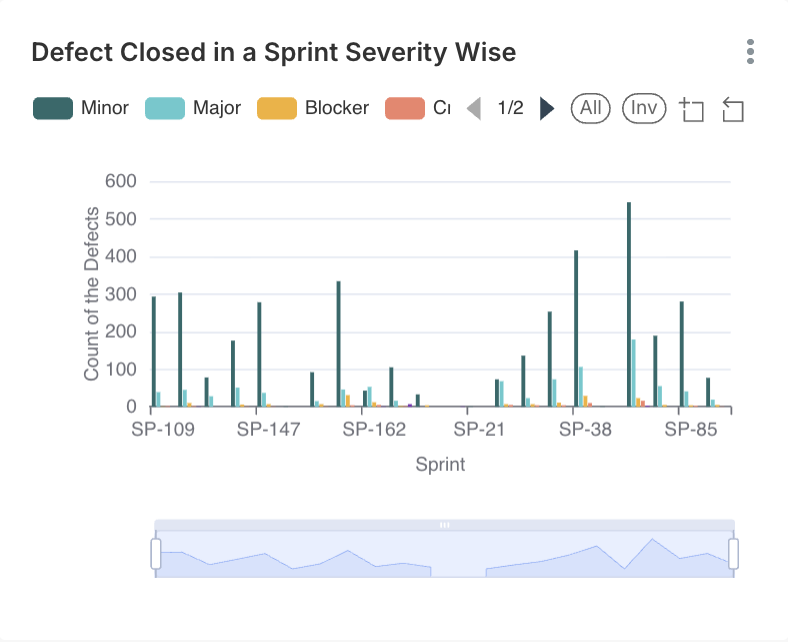
### Defect Closed in a Sprint – Severity Wise
#### Description
Shows **defects closed in a sprint**, grouped by severity.
#### Axis Details
* **X-Axis:** Sprint
* **Y-Axis:** Number of Defects
#### Interpretation
* Closing high-severity defects improves release confidence.
#### Business & Operational Value
* Measures stabilization progress
* Sprint closure validation
***
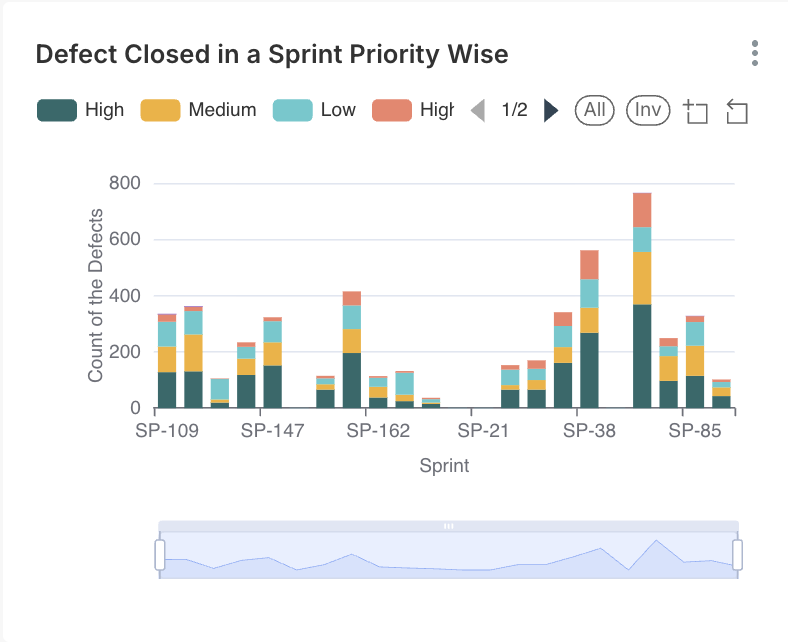
### Defect Closed in a Sprint – Priority Wise
#### Description
Displays **defects closed in a sprint**, categorized by priority.
#### Axis Details
* **X-Axis:** Sprint
* **Y-Axis:** Number of Defects
#### Interpretation
* Closing high-priority defects early reduces release risk.
#### Business & Operational Value
* Confirms defect triage effectiveness
***
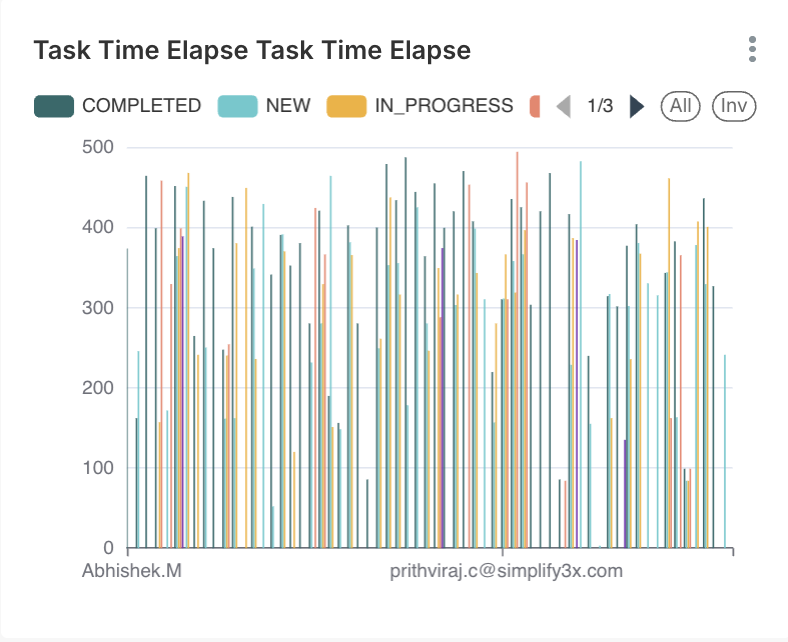
### Task Elapse Time
#### Description
Tracks **time taken to complete tasks**.
#### Axis Details
* **X-Axis:** Task ID / Time
* **Y-Axis:** Elapsed Time
#### Interpretation
* Long elapse times highlight dependencies or inefficiencies.
#### Business & Operational Value
* Improves execution predictability
* Supports process optimization
***
### Key Takeaways & Best Practices
* Releases should not proceed with **open high-severity defects**
* Always correlate **defect, execution, and story status** before sign-off
* Use risk analysis widgets for **feature and epic-level decisions**
* Monitor defect leakage to continuously improve QA effectiveness
---
# Agent Instructions
This documentation is published with GitBook. GitBook is the documentation platform designed so that both humans and AI agents can read, navigate, and reason over technical content effectively. Learn more at gitbook.com.
## Querying This Documentation
If you need additional information that is not directly available in this page, you can query the documentation dynamically by asking a question.
Perform an HTTP GET request on the current page URL with the `ask` query parameter, and the optional `goal` query parameter:
```
GET https://docs.simplifyqa.ai/dashboard/release-dashboard-guide.md?ask=&goal=
```
`ask` is the immediate question: it should be specific, self-contained, and written in natural language.
`goal` is optional and describes the broader end goal you are ultimately trying to accomplish on behalf of the user. GitBook uses it to tailor the answer towards what is most useful for that goal.
The response will contain a direct answer to the question and relevant excerpts and sources from the documentation.
Use this mechanism when the answer is not explicitly present in the current page, you need clarification or additional context, or you want to retrieve related documentation sections.